In addition to blogging, I'm also using Twitter. Follow me @matthawley One of my many (almost) daily tasks when working on the CodePlex platform since releasing Mercurial as a supported version control system, is converting projects from Team Foundation Server (TFS) to Mercurial. I'm happy to say that of all the conversions I have done since mid-January, the success rate of migrating full source history is about 95%. To get to this success point, I have had to learn and refine several techniques utilizing a few different tools to get the job done. Before I jump into the meat of the post, there are several setup tasks that need to be done first.
Configuring Mercurial
Mercurial comes with a pre-packaged extension, convert, which supports nearly all major version control systems (Subversion, CVS, git, Darcs, Bazaar, Monotone, GNU Arch, and yes - even itself). Because this is an extension, you need to enable it in the Mercurial configuration. Open the Mercurial.ini file located at C:\Users\<UserName> and add the following lines
[extensions]
convert =
Once this is saved, you can test if this extension is working by typing the command hg help convert If things are configured correctly, it should display the help information regarding the convert extension.
Conversion Setup
Mercurial's convert extension allows you to have somewhat full control when performing the conversion. These options include mapping usernames, including/excluding certain paths, and renaming branches. These configuration options are to our advantage since TFS requires Active Directory and stores all commits in the format of DOMAIN\User (though this format is perfectly acceptable, it's not ideal). Utilizing the ability to map usernames, create a new text file named auths.txt and start adding your mappings:
CONTOSO\Joe = Joe
CONTOSO\Mark = Mark
It is only necessary to add username mappings that appear in the TFS source history. Later, you will see how this username mapping file is used.
Utilizing SvnBridge
The first approach I take for doing project conversion for CodePlex, which has a success rate of 85%, is using the hosted SvnBridge. From the command line type the following
hg convert --authors auth.txt https://xunitcontrib.svn.codeplex.com/svn xunitcontrib
If the conversion works, your project will be successfully converted to Mercurial. It is recommended that you view the log history to ensure everything is in order. Should anyone continue to check in sources, just re-run the conversion on the already-converted Mercurial repository, and it will convert anything new.
Utilizing A Suite of Tools
Should the hosted SvnBridge not work, or you have TFS hosted elsewhere, the process is not nearly as straight forward and requires the use of several tools. Download and install the following
- tfs2svn - This converts TFS history into Subversion history
- VisualSVN Server - Used as the intermediary Subversion repository store
- TortoiseSVN - Used for storing the Subversion credentials as well as admin tasks
After you have installed all of these tools (and probably rebooted your machine), follow these steps.
Step 1: Create an empty repository in VisualSVN Server. This is where the history from TFS will be migrated to as an intermediary step. Make sure that you do not select Create default structure (trunk, branches, tags). If you accidently check this option your import via tfs2svn will fail because it is expecting an empty repository.
Step 2: On the newly created repository open the Manage Hooks dialog by Right Clicking Repository -> All Tasks -> Manage Hooks... Edit the Pre-revision property change hook by entering a single carriage return. This is necessary for enabling hook which allows tfs2svn to rewrite the history in Subversion. If the hook is enabled correctly, it will become bolded in the list of available hooks. Click OK to discard the dialog, and restart the VisualSVN server by Right Clicking VisualSVN Server -> Restart
Step 3: You now need to add a user account to VisualSVN server so that tfs2svn can authenticate and import the history. In VisualSVN, right click Users and select Create User. Type in a easy-to-remember username and password and click OK. How tfs2svn operates, is that it uses cached Subversion credentials for the import. The easiest way of caching your credentials, is checking out your new Subversion repository. When prompted for credentials, ensure the checkbox Save Authentication is checked.
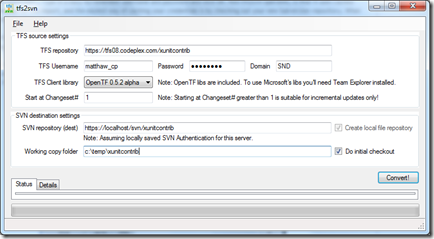
Step 4: Launch tfs2svn and start filling in the connection information to your TFS and Subversion servers. Once the information is correctly filled out, click the Convert button and wait while it starts extracting the history from TFS and importing it into your Subversion repository.
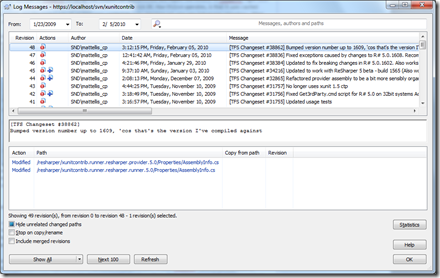
Step 5: Once the tfs2svn process has been completed, you can view the history of the Subversion repository. One thing you'll notice, is that tfs2svn prefixes all commit messages with "[TFS Changeset #12345]". There are also some instances where tfs2svn will add "tfs2svn: " as a commit message as well. If you don't care if your Mercurial repository will have these messages, skip to step 6 - otherwise continue on.
To remove the erroneous commit messages, you will need to rewrite the Subversion log using administrative tools. The process follows
- Get an XML log of the repository history
- For each logentry in the XML log get the msg content and remove the messages
- Create a temporary file writing the updated log message to it
- Call the setlog command on the executable svnadmin passing in the path to the temporary file in step 3.
As you can see, this is a tedious process - so I automated it with a Powershell script (downloadable here). The script assumes that your VisualSVN server can be accessed at https://localhost/svn/<RepositoryName> as well as the physical path of your VisualSVN repositories are located at C:\Repositories. Once you have updated the script, place it in %My Documents%\WindowsPowerShell, open a Powershell command prompt and type rewrite-log RepositoryName
Note: If you view the Subversion log again, you may notice that the message for each revision still contains the content we were trying to strip off. If this is the case, don't worry - the history has been rewritten, and you may be viewing a cached version of the repository.
Step 6: Now that you have your repository migrated to Subversion and you have rewritten the log , you can now convert it into a Mercurial repository. Using the same syntax as SvnBridge conversion earlier, type the following on you command line
hg convert --authors auth.txt https://localhost/svn/xunitcontrib xunitcontrib
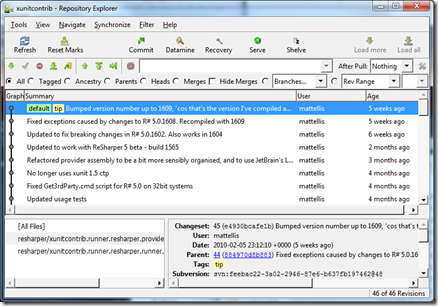
Once completed, you will have a full history of your TFS repository converted to Mercurial! You can now start using your local repository immediately or push the history to a central repository for others to start using.

89cce6b5-adb9-4cb3-bd1b-ad0959d285f4|0|.0